AI BID MANAGEMENT SOFTWARE FOR GENERAL CONTRACTORS

Know what every bid includes before you carry it

Invite subs, collect their bids, and level them against your budget, all on one record. Kit reads the proposals and lines them up scope by scope. Your team decides what to carry.

Illustration with demo data: three drywall bids are leveled against the estimate. Kit flags that Keystone excludes shaft wall and Pacific omits firestopping, plugs are added at the estimate, Summit Interiors is carried as the low leveled bid at $1,284,000, and a person merges the change request into the main budget.

Andres Construction logo Auch Construction logo Biltmore Construction logo Capstone logo Conlon Construction logo Corderman Co logo CoreBuilt logo Cranshaw Construction logo Descor logo Dojo logo E.E. Reed Construction logo Ellison logo Estes Construction logo Grunley Construction logo Harvey Cleary logo Jackson Construction logo KPRS Construction logo Magil Construction logo Mint Construction logo Mitchell Construction logo Moss Construction logo Pavilion Construction logo Rycon Construction logo SC Builders logo Stout Construction logo WPC logo

The quotes are in. Now what do they include?

Every sub sends a different PDF with a different idea of what “complete” means. Buildr collects the bids, AI takes the first read, and your estimators spend their time on the decision.

Bids land on the record

Bids from the Bidding Portal, invitation replies, and Bulk Upload land on each sub's record, organized for review. Less chasing proposals across inboxes.

AI does the first read

Kit pulls the key numbers and scope out of every proposal and flags potential gaps. Your team gets through bids faster and sees what may be missing.

Your team makes the call

With the first pass done, estimators spend their time on analysis and deciding what to carry. Nothing reaches the budget until a person merges it.

ITB, built in

Manage the whole bidding process in Buildr.

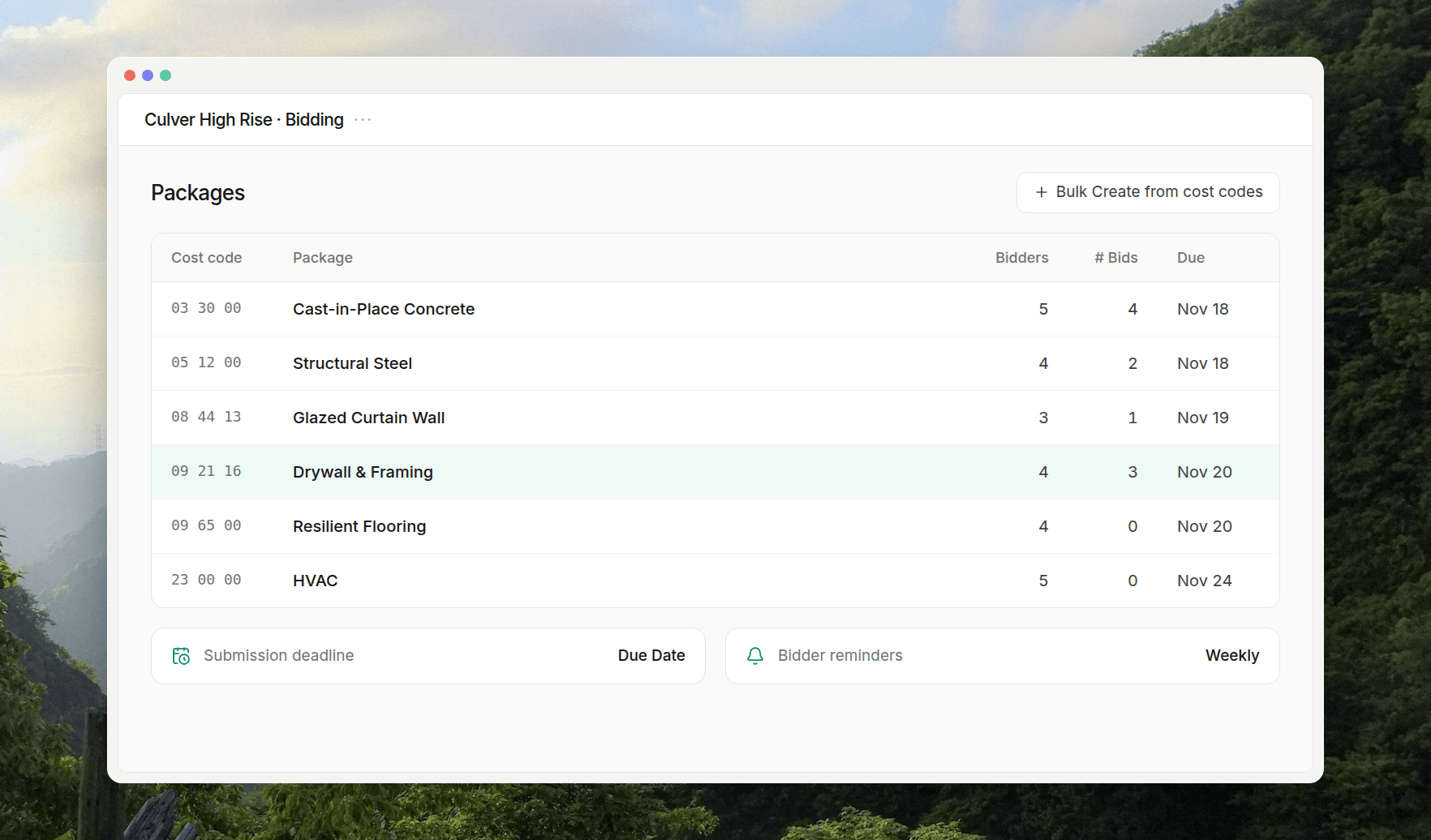
Bid packages, documents, invitations, reminders, and every bid that comes back, all in Buildr's ITB tool. Subs don't need an account, and nobody keeps a spreadsheet of who went quiet.

Illustration with demo data: the Bidding package list for a project, with each package's cost code, bidder count, bids received, and due date, plus the submission deadline rule and weekly reminders.

Illustrative examples with demo bidders and data.

Kit in action

Level a package in one conversation.

Kit does the reading and the lining up. Your team approves the setup, decides what to plug, and merges what it carries. Your main budget doesn't move until then.

Illustration with demo data: three drywall proposals are dropped into Kit's Bid Leveling skill for Culver High Rise. Kit reads them and lists each subcontractor's base bid as quoted.

Illustrative example with demo bidders and pricing.

One record for every bid, so your agents start with context.

Bid packages, invitations, subs, bids, leveling, and carried pricing live on one connected record in Buildr. Kit works on it inside the app. Through the Buildr MCP server, the AI your team already uses can work on it too.

Connect your AI to Buildr

Every number has a trail

Each carried price traces back to the bid, the invitation, and the package it came from. When someone asks why you carried a number, the answer is already there.

History your agent can use

Ask Kit which bidders you've worked with before or how often a trade partner has bid with you. It answers from your records, not a blank chat.

The budget stays a human call

Leveling edits from Kit or any connected agent land on a change request. Only a person can merge it into your budget.

Questions about bidding in Buildr

Do subcontractors need a Buildr account to bid?

No. Every invitation and message has a button that opens the Bidding Portal, with no login or password. Subs say whether they'll bid, download your bid documents, and upload their proposal. They can also reply to the invitation email with the proposal attached.

What if a sub emails a bid straight to an estimator?

Drop the files into Bulk Upload on the package's Bid Level tab. Buildr reads each one to match the company, contact, and base bid total, and you confirm them in one pass. You can also hand the PDFs to Kit.

Do I have to use Kit to level bids?

No. The same leveling table is on every bid package's Bid Level tab, and you can fill it in yourself. Kit is the fastest way to read the proposals and fill it in.

Can Kit change my budget on its own?

No. Bid leveling happens on a change request, so your main budget stays untouched while you level. A person reviews the current and proposed values and merges the change request. Kit also asks before it sends invitations or emails your bidders.

Can our own AI agent work on bids?

Yes. Through the Buildr MCP server, Claude, ChatGPT, Microsoft Copilot, or Grok work with your account's permissions. They can invite and email bidders directly, so ask for what you mean. Their leveling edits land on a change request that a person merges in Buildr.

How is Bidding different from Estimating?

Estimating is where you build the number: budgets, historical costs, revisions, and value engineering. Bidding is where you get it priced: bid packages, invitations, sub bids, leveling, and carrying sub pricing back into that same budget.

Find the gap before it finds your budget.

See how Buildr runs bid day from the same budget you estimated, with Kit doing the first read and your team making the calls.